1
File. That's the app
13
Controller dialects
116
Self-tests, all green
80+
Parametric fab parts
$0
While in beta
The whole job, one tool

CAD, CAM and machine control that actually talk to each other.

Most shops juggle a drawing app, a CAM package and the controller software — and the mistakes live in the gaps between them. M-FAB is all three, so the gaps don't exist.

Draw it like you'd build it.

Drop parametric parts from a searchable catalog of 80+ real fab shapes — brackets, gussets, flanges, trailer parts — then edit dimensions, bolt patterns and slots directly. Or draw from scratch with CAD-grade snapping.

  • Pin what matters — lock a part or a bolt pattern red and it survives every edit around it.
  • Bend-aware — press-brake bend lines with K-factor math and a 3D fold preview.
  • Import anything — DXF, SVG, PDF, or trace a photo of an old part.
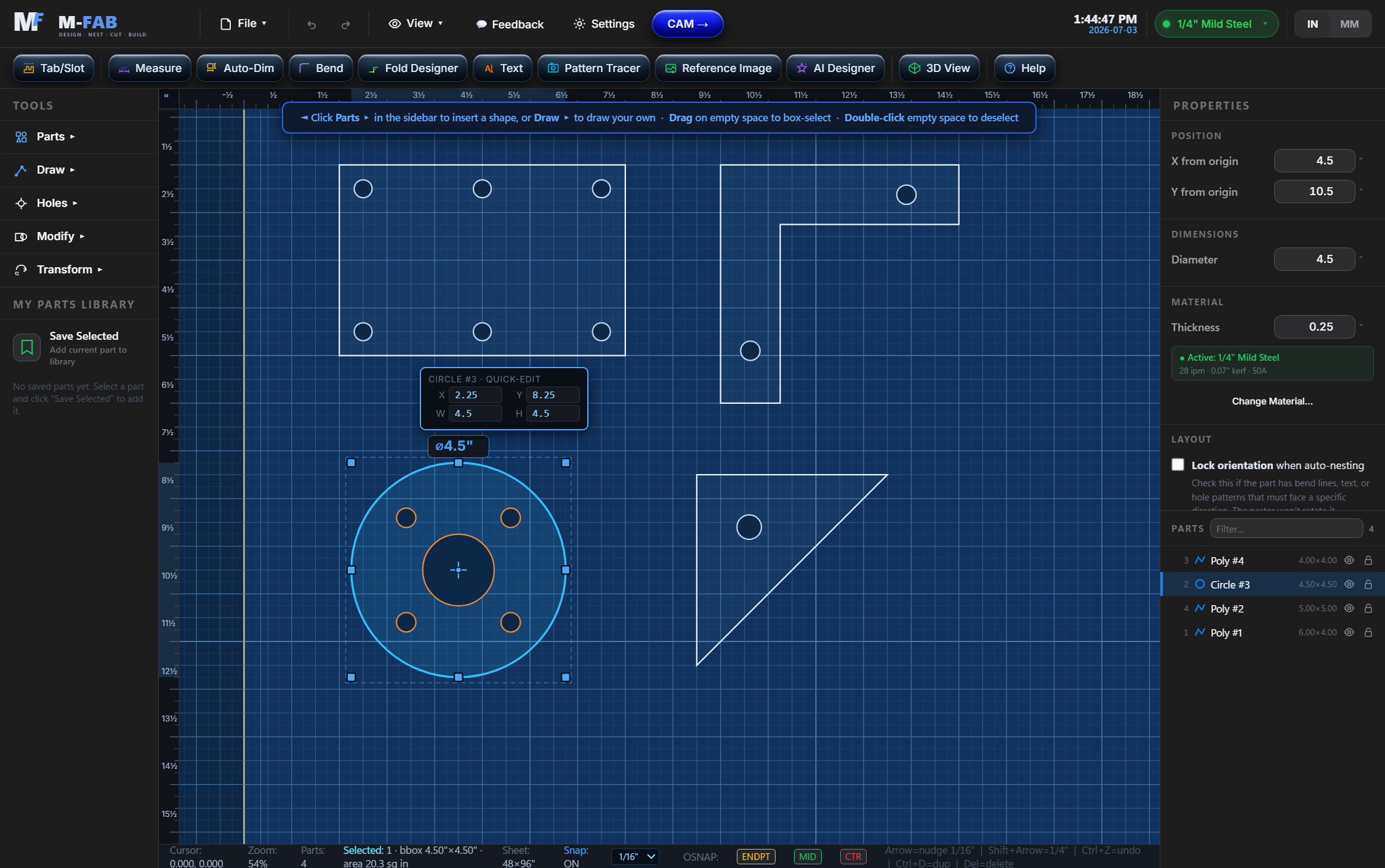
M-FAB design view: parametric parts with a selected flange showing live dimensions

A CAM cockpit that reads like a work order.

Every pierce, lead and cut in the exact order the machine will run it — grouped by part, with warnings pinned to the exact operation they belong to and one-click fixes next to them.

  • Cut-Readiness Score — ~20 shop-floor checks. Failures block export. ⚡ Fix automatically takes a messy job from 30% to 96% in one click.
  • Smart Holes — small holes cut first, slower, THC locked. Automatically.
  • Simulate from anywhere — watch the virtual torch run the path before the real one does.
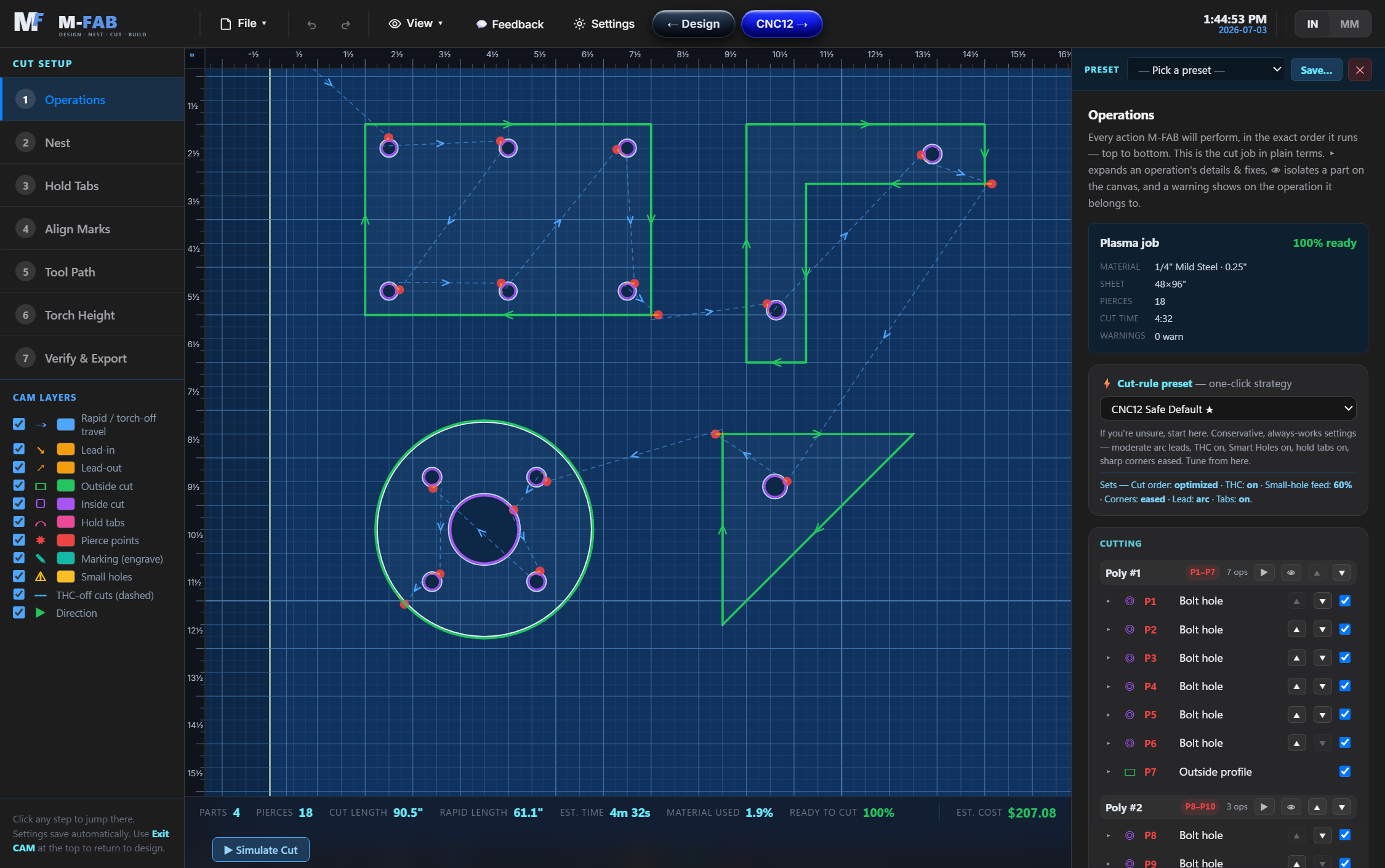
M-FAB CAM cockpit: toolpaths with numbered pierces and a 100% ready score

Smart Pierces

A live green/amber/red safety map shows where it's safe to fire the torch — and warns when a pierce sits next to a small part that could tip up.

Nesting, remnants, multi-sheet

True-shape auto-nest, a remnant library that remembers your drops, and jobs that overflow the sheet export as one program per sheet.

Live machine control

On Centroid CNC12, M-FAB is the operator screen: live DRO, jog, cycle start, THC volts, air pressure, consumable counters and a per-job notes pad.

G-code you can read

Commented, verified output with a ✓ Verify button that checks the program against your controller's conventions before it ever reaches the machine.

Cut reports & part labels

A printable shop traveler with utilization, cautions and operator sign-off — plus auto part labels engraved right on the metal.

Tested like it matters

116 built-in regression tests run in the app itself, and the native CNC12 output is locked byte-identical by a golden-hash test. Sheet metal isn't cheap.

Speak every controller

Your table already speaks M-FAB.

Pick your controller and the G-code comes out in its native dialect — probe cycles, THC codes, dwell units and all. Posts marked BETA pass every check and are being verified on real machines by the community.

Centroid CNC12NATIVE
Acorn plasma + THC — the reference dialect, locked byte-identical.
FireControlBETA
Langmuir CrossFire PRO/XR — IHS probe blocks, H-code THC, PS trailer.
FireControl 2DBETA
CrossFire without powered Z — pure 2D, no probe moves.
GRBLBETA
DIY tables with a Z axis — comment-free, explicit heights.
grblHALBETA
Plasma plugin THC — M62/M63 hole locking included.
GRBL 2DBETA
Two-axis tables — never sees a Z word.
LinuxCNC QtPlasmaCBETA
Controller-owned Z, native spot cycles, material magic comments.
Mach3BETA
Classic M03/M05 dialect, .tap files, external THC friendly.
Mach3 2DBETA
No-Z variant for two-axis Mach3 tables.
Mach4BETA
Integrated THC — same trusted skeleton.
UCCNCBETA
M31 touch-off before every pierce descent.
MASSO G3 / TouchBETA
G200 DTHC recipes, line numbers, millisecond dwells.
Generic plasmaBETA
Bring your own torch M-codes — covers the oddballs.
Built different

One file. Seriously.

The whole app is a single file

No installer, no dependencies, no "runtime". Every line of it opens from a double click — in the shop, in the office, on the machine PC.

Yours, offline

Your parts and projects live on your computer, not in someone's cloud. The internet can go down mid-cut and M-FAB won't notice.

Paranoid about your sheet

Readiness checks gate every export and every cycle start. A zeroed feed rate, an unsafe pierce, a part off the sheet — caught before the torch fires.

Pricing

Free while in beta.

BETA ACCESS
$0
during the beta — every feature included
  • Full CAD + CAM + machine control
  • All 13 controller posts
  • 80+ parametric parts, nesting, remnants
  • Runs offline, projects stay on your machine
  • Direct line to the builder via in-app feedback
Create your account
Paid plans arrive when M-FAB leaves beta. Early testers will be remembered — kindly.
FAQ

Fair questions.

Which controllers does it support?
Centroid CNC12 (Acorn) is the native dialect. FireControl (CrossFire PRO/XR and 2D), GRBL, grblHAL, LinuxCNC QtPlasmaC, Mach3, Mach4, UCCNC and MASSO G3/Touch each get their own post, plus a generic post with custom torch M-codes. Every post has a built-in verifier that checks the output against that controller's rules.
Do I need to be online to use it?
No. The app is a single file that runs in your browser and works completely offline. The website and your account need internet; cutting doesn't.
What happens to my designs? Are they private?
Your parts and projects are saved on your own computer — they're never uploaded unless you deliberately attach a project to a feedback report. During the beta, the hosted app records which sections you use, active time, and key/click counts (never what you type) so the builder knows what to improve. The full detail is in the privacy policy.
What does "BETA" mean on a controller post?
The post passes all of its automated checks but hasn't been proven on that physical machine yet. Dry-run first (torch off, above the plate), then tell us how it went — posts get promoted as real machines verify them.
When will it cost money?
When M-FAB leaves beta. Until then everything is free, and beta testers who helped get it there will be treated right when pricing arrives.
Who builds this?
A fabricator who got tired of juggling four programs to cut one bracket. M-FAB is built shop-first: every feature exists because a real sheet of steel was on the line.

Stop babysitting your CAM.

Create a free account, get on the beta list, and cut like the software has your back — because it does.

Create free account